Table of Contents
Introduction
This chapter describes briefly the high-level API of Advanced BOLOS Graphic Library.
This layer offers a simplified view of a screen page (or multi-pages), using predefined models, like a centered info, or a menu list, managing the internal navigation between the internal pages of a step.
A full description of each type of steps can be found in this document
Concepts
This layer uses the complex-objects API described in Complex objects layout API, but all objects are hidden, in favor to fields to configure, for example texts, icons and callbacks.
Moreover, positions of objects in the page are hidden and automatic.
And finally, if a step requires using multiple pages (for example for a long text to display, or a long menu list), the step engine manages the navigation between these pages.
Operations
Draw a step
The configuration of a step is provided in a single function call, and all predefined pages APIs will do the following operations:
- Create the page
- Add required complex objects in the page
- Draw the objects in the framebuffer
- Refresh the display with framebuffer content
For every types of steps, the navigation inside the step is managed by the step engine, but even for navigation outside it (between steps of a flow), the navigation arrows are drawned by the engine.
A few APIs are available to draw typical pages, like:
- nbgl_stepDrawText() to draw a text and a sub-text on one or several lines/pages, with navigation
- nbgl_stepDrawCenteredInfo() to draw an icon, a text and a sub-text in a single page, with navigation
- nbgl_stepDrawMenuList() to draw a menu list, with navigation
- nbgl_stepDrawSwitch() to draw a toggle switch with its name and description, with navigation
Typical step types
Generic Text Step
This type is intended to draw one or two centered (vertically and horizontally) text(s) in the screen.
If there is no sub-text and the main-text doesn't fit in a single page (taking wrapping into account), the text is automatically split into several pages, and the navigation is set accordingly, and manage automatically between these internal pages. See first example.

If there is a sub-text, the main-text must fit in a single line. The sub-text can be multi-pages, and in this case the main-text is considered as title, and an indication is automatically added to this "title" to show the current "page" and number of pages. See second example.
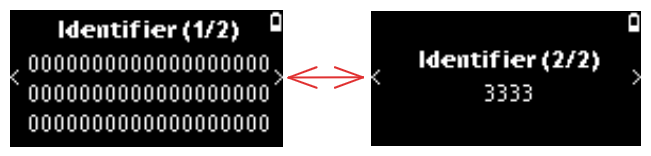
The API to insert such an object is nbgl_stepDrawText() with:
- A callback to handle the actions on buttons (left, right or both)
- A potential ticker configuration.
- A potential main text
- A potential sub-text
- The position of the step in a flow (see Step Positioning)
- A boolean to indicate whether this step is modal or not
- The style to use for text and sub-text (REGULAR_INFO or BOLD_TEXT1_INFO)
- Note
- left or right buttons actions are only notified with the provided callback if on the first page (for left) or on the last page (right) for a multi-pages step.
Centered Info Step
This type is intended to draw a centered info, with an icon, a main text and a sub-text in the screen. The texts are optional.
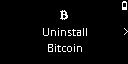
The API to insert such an object is nbgl_stepDrawCenteredInfo() with:
- A callback to handle the actions on buttons (left, right or both)
- A potential ticker configuration
- A mandatory icon
- A potential main text
- A potential sub-text
- The position of the step in a flow (see Step Positioning)
- A boolean to indicate whether this step is modal or not
- The style to use for text and sub-text (REGULAR_INFO or BOLD_TEXT1_INFO)
Menu List Step
This type is intended to draw a menu list, and manage the navigation between the items of the list
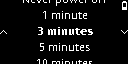
The API to insert such an object is nbgl_stepDrawMenuList() with:
- A callback to handle the selection (press both buttons) of a menu item
- A potential ticker configuration.
- The menu list description structure
- The position of the step in a flow (see Step Positioning)
- A boolean to indicate whether this step is modal or not
To retrieve the index of the item currently selected in a menu list step, use nbgl_stepGetMenuListCurrent() with:
- The step context returned by nbgl_stepDrawMenuList()
It returns the zero-based index of the currently highlighted menu entry.
Switch Step
This type is intended to draw a single toggle switch with its name and an optional description, in a single page, with navigation arrows.
- Note
- The switch name must fit on one line; the description may span at most two lines.
The API to insert such an object is nbgl_stepDrawSwitch() with:
- The position of the step in a flow (see Step Positioning)
- A callback to handle the actions on buttons (left, right or both)
- A potential ticker configuration.
- A pointer to the switch description structure (nbgl_layoutSwitch_t), containing the switch name, description and initial state
- A boolean to indicate whether this step is modal or not
Releasing a step
Before leaving a screen built with a layout, it must be released with a call to nbgl_stepRelease(). It will free the allocated objects.
Releasing a step has no effect on the display, even if a modal step is released.
- Note
- Releasing is mandatory for modal step, but if on background, it will be automatically released when a new step will be allocated
Step Positioning
Usually, a step is part of a flow (list of steps, to be parsed in forward or backward direction). To indicate to the end-user that navigation between steps is possible, navigation arrows need to be displayed on left and right sides of the screen (as < and > 'arrows').
The navigation can also loop in some cases (only for Applications), which means that at the end of the last step, when pressing right button the engine will display the beginning of first step (and vice versa).
To indicate to step engine which 'flow navigation' to draw, an argument (position) is provided to all API used to create steps. This argument (of type nbgl_stepPosition_t) can take the following values:
- SINGLE_STEP if this is a single step flow (in this case, no 'flow navigation' is displayed)
- FIRST_STEP if this is the first step in a multiple steps flow
- LAST_STEP if this is the last step in a multiple steps flow
- NEITHER_FIRST_NOR_LAST_STEP, if this is the neither the first nor the last step in a multiple steps flow