Table of Contents
Introduction
This chapter describes briefly the mid level API of Advanced BOLOS Graphic Library.
This layer offers a simplified view of a screen page, using complex (aggregated) objects, like a centered info or a set of navigation arrows.
A full description of each functions/types can be found in this document
Concepts
This layer uses the low-level API described in Advanced BOLOS GL API, but all graphic objects are hidden, in favor to abstract complex objects like a centered info or a set of navigation arrows.
Moreover, positions of objects in the page are mostly hidden and automatic.
Example
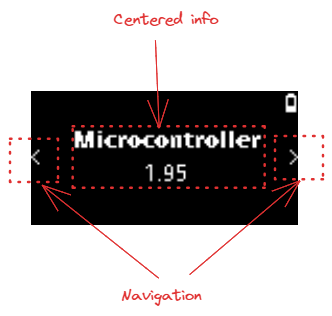
In this example, 2 "objects" are used and added to the page with dedicated APIs:
- A centered information area with an icon and a main text
- A set of navigation arrows, indicating that the user can use left/right buttons to navigated across pages
Common operations
Getting a new layout
The first operation is always to get a new layout, with the desired parameters:
- An action callback used for all controls of the page
- A boolean indicated whether the page is modal or not (on top of existing ones, or in background plane)
- A potential ticker configuration if a ticker is required for the page
The function to actually create the layout is nbgl_layoutGet()
For example:
Drawing a populated layout
Once defined and populated, all objects can be drawn in framebuffer with a simple call to nbgl_layoutDraw().
Populating a layout
Once the layout is defined and retrieved with nbgl_layoutGet(), the page can be filled with complex objects.
Centered info area
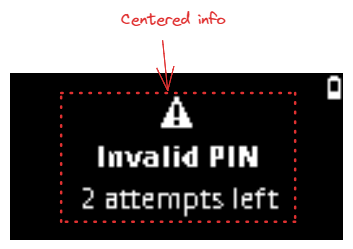
This object is made of:
- An optional icon
- An optional main text under the icon
- An optional sub text under the main text
The whole object is centered horizontally in the page
It can be either centered vertically or put on top of the page.
The API to insert such an object is nbgl_layoutAddCenteredInfo(), using nbgl_layoutCenteredInfo_t structure
The fonts for the texts depends of the style field used in nbgl_layoutCenteredInfo_t.
- if REGULAR_INFO, main text and sub text are in regular case
- if BOLD_TEXT1_INFO, main text is in bold case (and sub text in regular case)
Navigation area
or
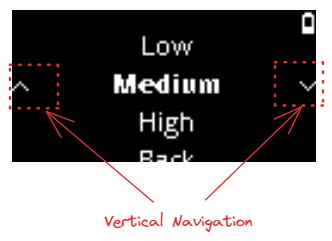
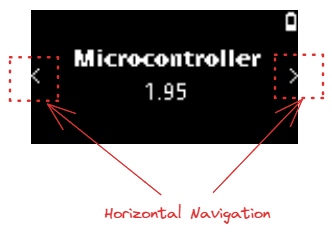
This object is made of:
- 1 or 2 arrows on left and right of the screen
The arrows are centered vertically in the page
There are two styles for the arrows:
- either HORIZONTAL_NAV for navigation between pages
- or VERTICAL_NAV for navigation between menu items
The API to insert such an object is nbgl_layoutAddNavigation(), using nbgl_layoutNavigation_t structure
The "direction" and the number of arrows (left, right or both) to use are set in nbgl_layoutNavigation_t.
Menu List area
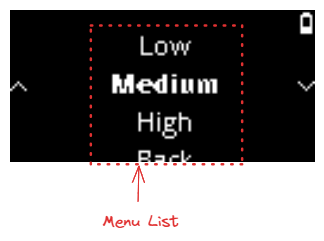
On screen, the visible part of his object is made of up to 5 menu item elements (single line, centered horizontally)
The first and last of the 5 lines are only partially visible (horizontal cut)
The API to insert such an object is nbgl_layoutAddMenuList(), using nbgl_layoutMenuList_t structure, which enables to configure:
- The total number of items in the list.
- The selected item index in the list (that will be highlighted in bold, and always be centered vertically)
- A callback that will be called to get the text of each displayed menu item
Keyboard-related objects
Some rare screens require displaying a keyboard at the bottom of the page, to enter text.
The text to enter may be a generic string or a word (for example BIP39).
Here is an example of these pages in Bolos UX:
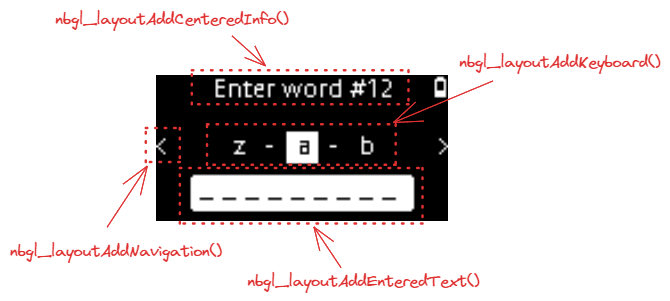
To build such screens, some dedicated APIs are necessary, which will be detailed in the sub-chapters.
Adding/Updating keyboard
This object, in the center of screen (with a margin), proposes a rotating keyboard, displaying 3 letters at max, (from 'a' to 'z' in letters-only).
The parameters to configure this object are:
- The mode in which to start the keyboard (letters, digits or special characters)
- A boolean to indicate whether to display only letters, with no space and no shift key to switch between modes
- A boolean to indicate whether to display a backspace key or not.
- A boolean to indicate whether to display a validate key or not.
- A 32 bits mask used to invalidate (remove) some keys on the keyboard (in letters-only mode).
- A function to be called when an active key is pressed
The API to insert such an object is nbgl_layoutAddKeyboard(), with nbgl_layoutKbd_t structure as parameter.
This function returns a positive integer (if successful) to be used as an index in nbgl_layoutUpdateKeyboard() function, used to modify an existing keyboard.
- Note
- the 32 bits mask works like this:
- If mask[0] bit is 1, the 'a' key is invalid
- If mask[1] bit is 1, the 'b' key is invalid
- And so on in "abcdefghijklmnopqrstuvwxyz" string.
- If mask[26] bit is 1, the backspace key is not used
Adding/Updating entered text
This object, displayed under the keyboard consists in a set of 9 placeholders representing the text entered with the keyboard.
If text is too long to be displayed (more than 8 characters), the beginning is replaced by ".."
The only parameter to configure this object is:
- The text to display
The API to insert such an object is nbgl_layoutAddEnteredText().
This function returns a positive integer (if successful) to be used as an index in nbgl_layoutUpdateEnteredText() function, used to modify the text.
Example
Here is the source code to display the example:
Keypad-related objects
Some rare screens require displaying a keypad at the bottom of the page, to enter digits.
The digits to enter are usually a PIN code, to enter or to confirm.
Here are some example of these pages in Bolos UX:
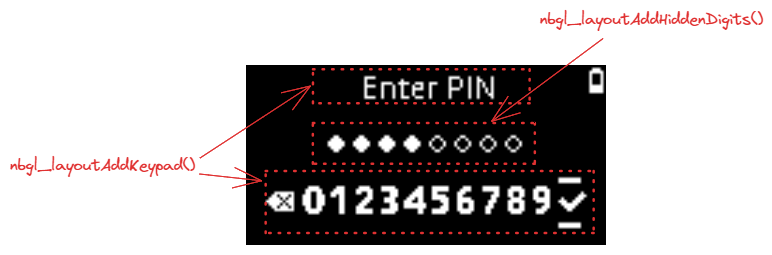
To build such screens, some dedicated APIs are necessary, which will be detailed in the sub-chapters.
Adding/Updating keypad
This object is made of an area at the bottom of the screen, presenting the 10 digits, a backspace and a validate keys, that can be navigated with left and right buttons and selected with both buttons. And a title at the top of the screen.
The only parameters to configure this object (at creation time) are:
- the callback associated with active keypad key selection.
- a boolean to choose between shuffled (selection starts with any key) and regular mode (selection starts at '5' key).
- a single line string to use as title.
The API to insert such an object is nbgl_layoutAddKeypad().
This function returns a positive integer (if successful) to be used as an index in nbgl_layoutUpdateKeypad() function, used to modify the active keys of an existing keypad (backspace and validate keys).
- Note
- at creation time, backspace and validate keys are inactive
Adding/Updating keypad content
This object consists in:
- an optional title
- either:
- up to 12 discs (invisible or visible) corresponding to hidden entered/not entered digits.
- or up to 12 digits if not hidden
The parameters to configure this object are:
- The optional title (NULL if not used)
- A boolean to indicate whether digits are hidden or not
- The number of total digits to be displayed (all digits are considered as "not entered")
- The digits to be displayed if not hidden
The API to insert such an object is nbgl_layoutAddKeypadContent().
This function returns a positive integer (if successful).
The nbgl_layoutUpdateKeypadContent() function can be used to modify the number of entered digits or the digits.
Refreshing screen
After having drawn graphic objects in framebuffer, it is necessary to transfer the content of the framebuffer on display. This operation is called a refresh.
The API to do that is nbgl_refresh() (in nbgl_obj.h)
It will only refresh the rectangle part of the screen having changed (with objects redrawn) since the last refresh.
Control actions management
Some controls can be interacted with thanks to the buttons.
The developer can subscribe to these events by providing an action callback in nbgl_layoutGet(), with nbgl_layoutTouchCallback_t prototype.
The first parameter (token) of this function is a token provided along with the definition of the complex object.
The second parameter (index) is only used for some types of complex objects:
- Bar List choices: in this case, index gives the index of the selected bar.
- Radio button choices: in this case, index gives the index of the selected choice.
- Switches: in this case, index is 0: it is up to the Apps to know what to do here.
- Info buttons: in this case, index is 0 (useless)
Releasing a layout
Before leaving a screen built with a layout, it must be released with a call to nbgl_layoutRelease(). It will free the potentially allocated objects.