Table of Contents
- Introduction
- Concepts
- Use Cases
- Home & Settings screen Use Case
- Confirmation Use Case
- Choice Use Case
- Choice with Details Use Case
- Advanced Choice with Details Use Case
- Action Use Case
- Status Use Case
- Pre-defined review status Use Case
- Review Use Case
- Light review Use Case
- Blind Signing Review Use Case
- Generic Review Use Case
- Generic Configuration Use Case
- Generic Settings Use Case
- Streaming review Use Case
- Review with warning Use Case
- Address Review Use Case
- Spinner Use Case
- Keypad Use Case
- Keyboard Use Case
- Utility functions
- Refreshing screen
Introduction
This chapter describes the Application Use-cases API of Advanced BOLOS Graphic Library.
This layer offers a simplified view of some typical use-cases of display in an Application running on Nano devices. For example, a use-case can be:
- Reviewing a transaction/message
- Reviewing details on a given data of a transaction/message
- Displaying pages of settings
A full description of each predefined use-case can be found in this document
Concepts
This layer uses the high-level API described in Predefined Step API, but offers to developer more than a single step.
The goal is to simplify the usage of NBGL, but also to offer a better homogeneity across applications, by pushing developers to use common API for common use-cases.
So that not only the look of the pages but also their transitions look the same. Which should be a real help for end-users, getting more and more familiar with the user experience of applications.
Example 1: transaction review
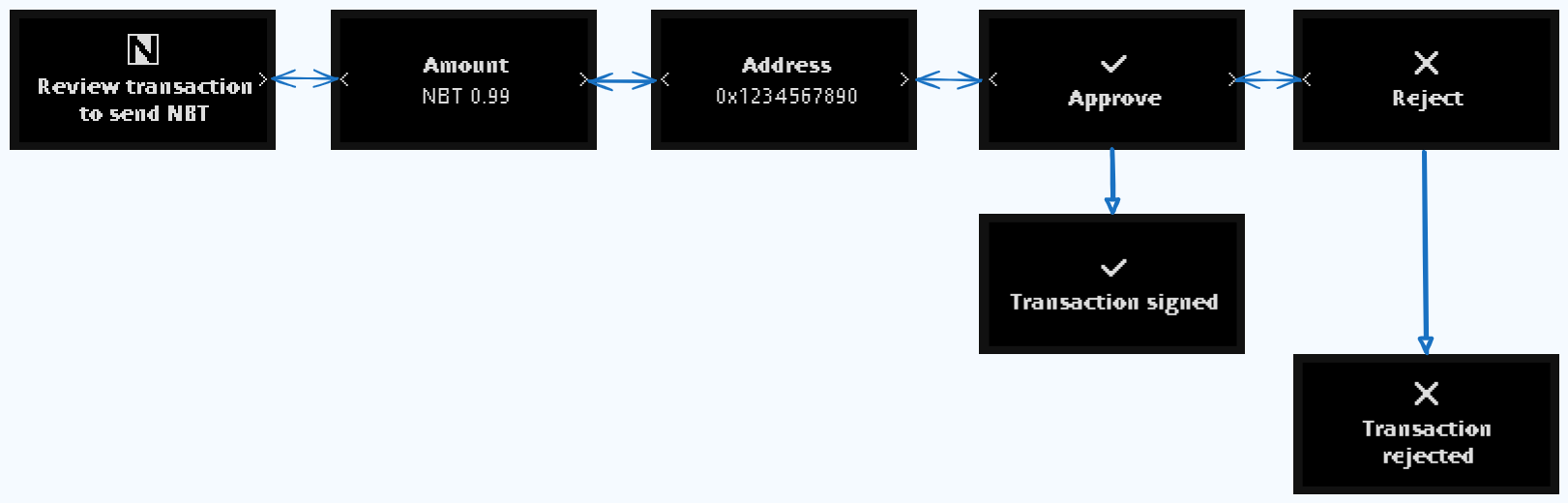
In this example, a transaction review consists in 5 successive pages, and can be seen as a use-case
Example 2: Settings pages
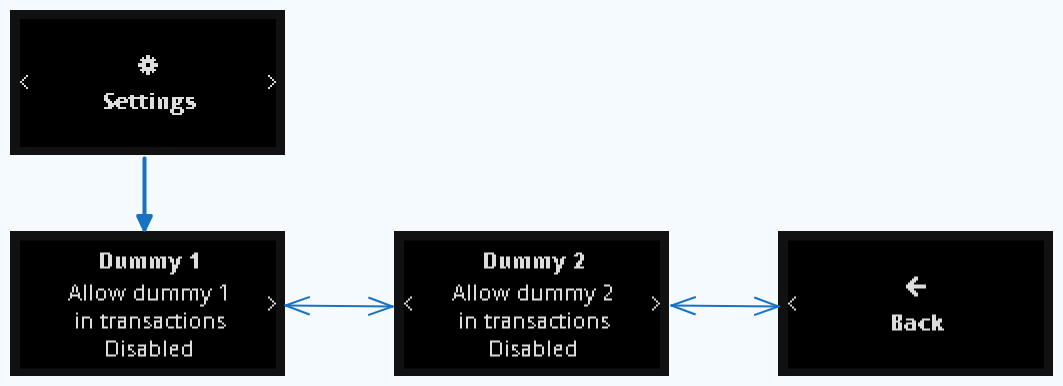
In this example, the settings (accessed from Settings in Home, single level) consists in 3 pages, and can be seen as another use-case.
Operation Type
All review Use-Cases take a nbgl_operationType_t parameter that encodes both a base type and a set of optional modifier flags, combined with a bitwise OR.
- Base type (nbgl_opType_t)
| Value | Description |
|---|---|
| TYPE_TRANSACTION | Transfer of a coin or operation on an account (broadcast on-chain) |
| TYPE_MESSAGE | Signature of a message that will not be broadcast on the blockchain |
| TYPE_OPERATION | Any other type of operation (generic) |
- Modifier flags
| Flag | Bit | Effect on UI |
|---|---|---|
| SKIPPABLE_OPERATION | 4 | Adds a Skip button on the first review page |
| BLIND_OPERATION | 5 | Shows a blind-signing warning page before the review |
| RISKY_OPERATION | 6 | Adds a risk-warning indicator on the first and last review pages |
| NO_THREAT_OPERATION | 7 | Adds an information indicator when Ledger security checks found no threat |
| ADDRESS_BOOK_OPERATION | 8 | Adjusts UI wording for address-book flows |
- Example
Icon sizes
On Nano devices there is no SMALL_ICON_SIZE / LARGE_ICON_SIZE constant. All icons and glyphs passed to use-case functions are expected to be 14×14 px, which matches the height of the standard Nano font and the internal SDK glyphs (e.g. C_icon_validate_14, C_Information_circle_14px).
Application icons (appIcon) should therefore also be provided as 14×14 px bitmaps.
Use Cases
A few APIs are available to draw typical Use-Cases, such as:
- For Home Screen & Settings:
- nbgl_useCaseHomeAndSettings() to draw the home page and settings/info pages (see Home & Settings screen Use Case)
- nbgl_useCaseGenericSettings() to draw only settings and info pages, without a home page (see Generic Settings Use Case)
- nbgl_useCaseGenericConfiguration() to draw a generic set of configuration pages with a title and a quit callback (see Generic Configuration Use Case)
- For Individual pages:
- nbgl_useCaseConfirm() to draw a typical confirmation page, for example when rejecting a transaction (see Confirmation Use Case)
- nbgl_useCaseChoice() to draw a typical dual choice page (see Choice Use Case)
- nbgl_useCaseChoiceWithDetails() to draw a choice page with an optional details sequence (see Choice with Details Use Case)
- nbgl_useCaseAdvancedChoiceWithDetails() to draw a choice page with an optional details modal (see Advanced Choice with Details Use Case)
- nbgl_useCaseAction() to draw a single action page with a centered icon, a message and an action button (see Action Use Case)
- nbgl_useCaseStatus() to draw a transient status page, without control, for example when a transaction is successfully signed (see Status Use Case)
- nbgl_useCaseSpinner() to draw an infinite spinner page (see Spinner Use Case)
- For most used reviews:
- nbgl_useCaseReview() to draw the pages of a regular coin transaction review, when all info are available from the beginning (see Review Use Case)
- nbgl_useCaseReviewBlindSigning() to draw the pages of a blind-signing review with a warning prolog (see Blind Signing Review Use Case)
- nbgl_useCaseReviewLight() to draw the pages of a transaction review with a simple button confirmation, when all info are available from the beginning (see Light review Use Case)
- nbgl_useCaseGenericReview() to draw a review from a generic contents list, with a configurable reject footer (see Generic Review Use Case)
- nbgl_useCaseReviewStreamingStart() to draw the pages of a regular coin transaction review, when all info are not available from the beginning (see Streaming review Use Case)
- nbgl_useCaseReviewStreamingBlindSigningStart() to start a blind-signing streaming review preceded by a warning page (see Streaming review Use Case)
- nbgl_useCaseAdvancedReviewStreamingStart() to start a streaming review with a warning prolog, when all info are not available from the beginning (see Streaming review Use Case)
- for reviews with a warning prolog:
- nbgl_useCaseAdvancedReview() to draw the pages of a regular coin transaction review, when all info are available from the beginning, but with an identified risk requiring a warning prolog (see Review with warning Use Case)
- For address verification:
- nbgl_useCaseAddressReview() to draw an address confirmation page, with a possibility to see some extra tag/value pairs (see Address Review Use Case)
- For keypad:
- nbgl_useCaseKeypad() to draw a default keypad implementation (see Keypad Use Case)
- For keyboard:
- nbgl_useCaseKeyboard() to draw a keyboard for text input (see Keyboard Use Case)
- For generic navigable content:
- nbgl_useCaseNavigableContent() to draw a level of generic content navigable pages
Home & Settings screen Use Case
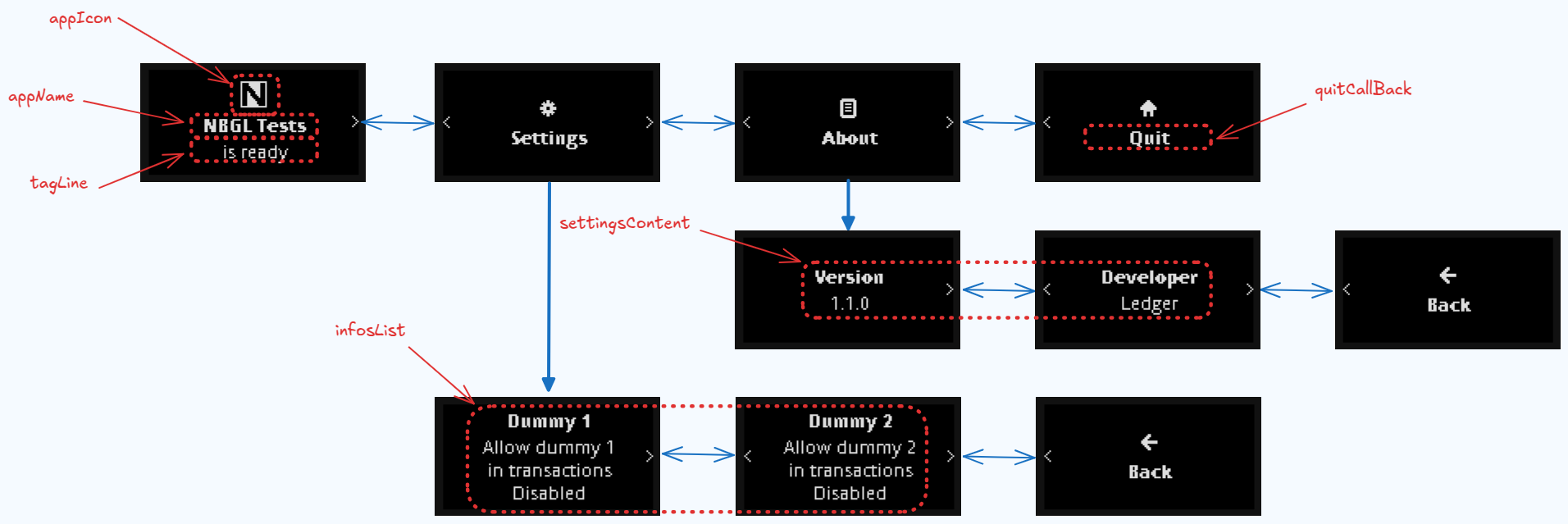
Ledger would like all application to have the same layout for home screen and settings/info, so the nbgl_useCaseHomeAndSettings() function enables to create such a set of page, the configurable parameters being:
- The application name (appName)
- The application icon (appIcon)
- The tagline, a text under app name (if NULL, it will be "<appName> is ready")
- The callback when touching quit application button
- The settings pages description
- The info pages description
Home & Settings screen with action button Use Case
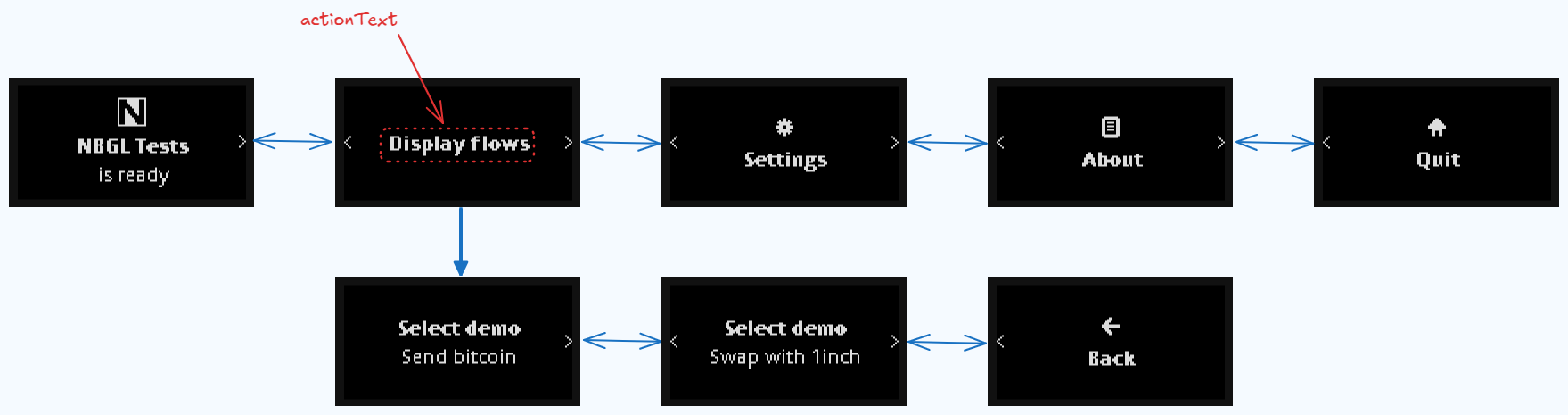
For some rare applications, one may need an action button in the Home screen, to perform either:
- The main action of the Application
- Or an side-action, as to display an address
The action argument of nbgl_useCaseHomeAndSettings() can be used for that. This structure (nbgl_homeAction_t) enables to specify:
- A text
- An optional icon
- A function to be called when the buttons are pressed
Confirmation Use Case
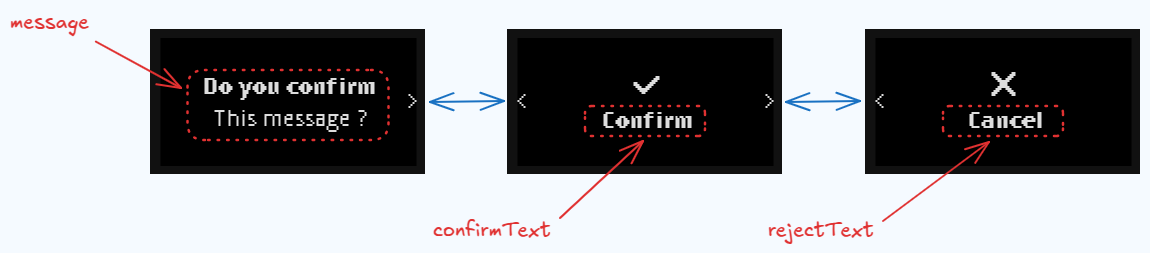
A confirmation use-case consists in 3 modal pages sequence:
- 1st page containing a fixed icon, a configurable message
- 2nd page to confirm (pressing both buttons)
- 3rd page to reject (pressing both buttons)
The nbgl_useCaseConfirm() function enables to create such a page.
The callback argument is called upon confirmation.
When rejected, this modal screen is simply dismissed, revealing the previous page on background.
Here is the code to display the example picture (and a status page for confirmation)
Choice Use Case
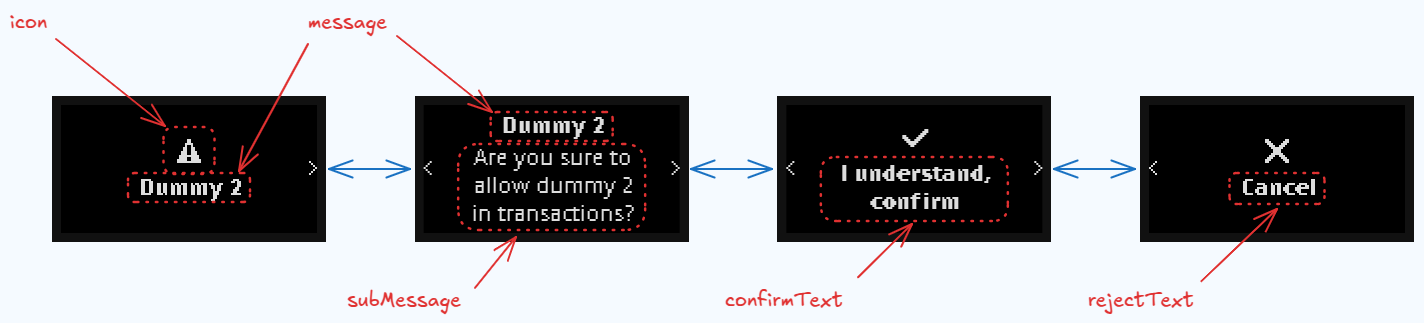
A choice use-case consists in a 4-page sequence:
- 1st page containing a configurable icon and a configurable title
- 2nd page containing a configurable message (text and subText)
- 3rd page to confirm, with a configurable message (pressing both buttons)
- 4th page to reject, with a configurable message (preesing both buttons)
The nbgl_useCaseChoice() function enables to create such a page.
The callback argument is called when a choice is done. Its argument is a boolean which is true upon confirmation, else false.
Here is the code to display the example picture
Choice with Details Use Case
A variant of Choice Use Case that adds an optional details page. When details is non-NULL, an extra navigation step is inserted in the sequence to display the details content.
- Note
- On Nano devices there is no top-right icon button. Instead, when details is non-NULL, an additional page is appended to the navigation flow so the user can reach the details by pressing the right button.
The nbgl_useCaseChoiceWithDetails() function accepts the same parameters as nbgl_useCaseChoice() plus:
- details (nbgl_warningDetails_t): description of the details page. If NULL, the sequence behaves exactly like nbgl_useCaseChoice().
The callback argument works the same way as in Choice Use Case.
- Note
- For a richer layout supporting a sub-message and a configurable header icon, see Advanced Choice with Details Use Case.
Here is an example:
Advanced Choice with Details Use Case
A variant of the Choice Use Case with an optional details modal page, accessible by an extra navigation step. The nbgl_useCaseAdvancedChoiceWithDetails() function enables to create such a sequence.
On Nano, the header_icon argument is ignored (no top-right icon button). A page displays the title* and, below it, a single other element, so the center_icon, the message and the subMessage* get a page each, in this order, all of them keeping the title on top. When details* is non-NULL, an additional page is inserted in the navigation to display the details content.
The callback argument is called when a choice is done. Its argument is a boolean which is true upon confirmation, else false.
Here is an example of usage:
Action Use Case
An action page consists of a centered info (icon + message) and a single action button at the bottom. The given callback is called when both buttons are pressed on the action page.
The nbgl_useCaseAction() function accepts the following parameters:
- icon: icon to display in the centered info
- message: text to display in the centered info
- actionText: label of the action button
- callback: function called when the action button is pressed
Here is an example:
Status Use Case
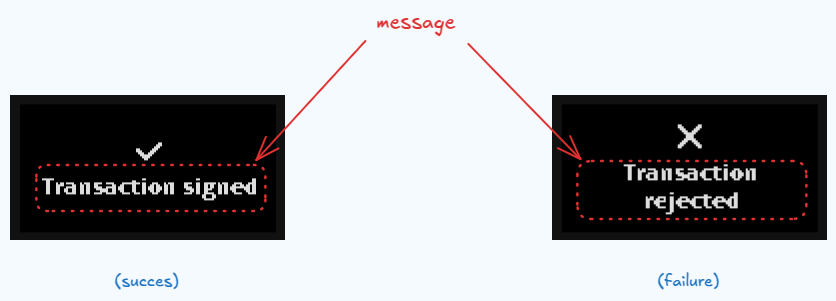
A status is a transient page, without control, to display during a short time, for example when a transaction is successfully signed. The nbgl_useCaseStatus() function enables to create such a page, with the following arguments:
- A message string to set in middle of page
- A boolean to indicate if true (to determine the icon)
- A quit callback, called when timer times out (or both buttons are pressed)
Pre-defined review status Use Case
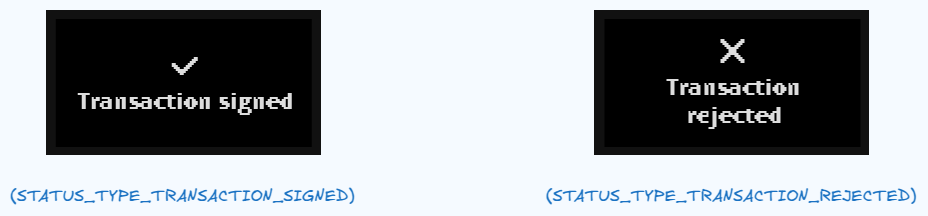
Similar as Status Use Case, this is used to display transient page, without control, during a short time, for example when a transaction is successfully signed. The nbgl_useCaseReviewStatus() function enables to create such a page, with the following arguments:
- A type of status (with predefined message and icon)
- A quit callback, called when timer times out (or both buttons are pressed)
Review Use Case
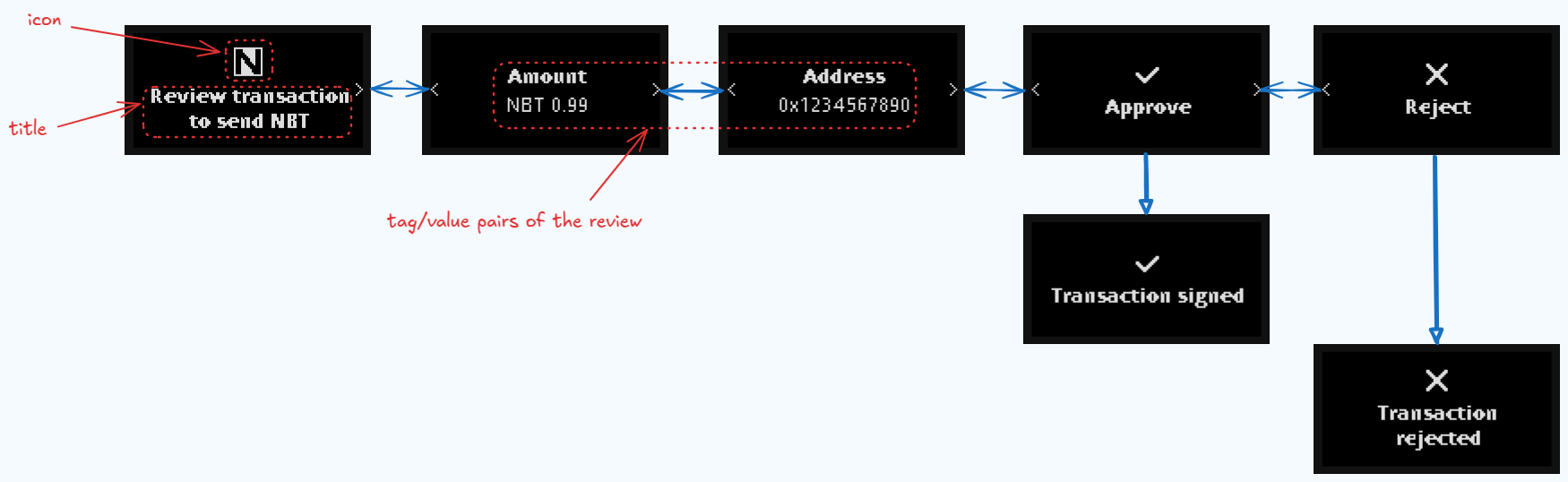
In most cases, the developer may know all tag/value pairs of a transaction when it is submitted.
Thus, the number of pages is computed automatically and pages can be navigated forward and backward.
- Note
- In case of a tag/value pair too long to be fully displayed, the value is automatically split on successive pages, adding an indication
(n/m)in the name.
At the end of the review flow, the user has 2 pages to Approve or Reject the transaction. Finally, the given callback is called and it's up to app's developer to call nbgl_useCaseReviewStatus().
The API to initiate the display of the series of pages is nbgl_useCaseReview(), providing:
- The type of operation to review (transaction, message or generic operation)
- The title and icon for the presentation page
- The list of tag/value pairs (or a callback to get them one by one)
- A callback called when the review is Approved or Rejected. The callback's param is true for approval, false for rejection.
Here is the code to display something similar to example picture:
Here is another version of the example code, using a callback mechanism to get tag/value pairs:
Light review Use Case
Not really useful on Nano devices, and thus, directly mapped to Review Use Case.
Blind Signing Review Use Case
A blind-signing review behaves exactly like Review Use Case, but the review is automatically preceded by a mandatory blind-signing warning page.
- Note
- On Nano devices, the optional tip-box parameter is ignored.
The API to initiate the display is nbgl_useCaseReviewBlindSigning(), providing:
- the type of operation to review (transaction, message or generic operation)
- the list of tag/value pairs (or a callback to get them one by one)
- the icon to use on the first and last pages
- the title and optional sub-title of the first page
- the title of the last page (with the approve/reject pages)
- an optional tip-box (nbgl_tipBox_t) — ignored on Nano
- a callback called when the review is Approved or Rejected. The callback's param is true for confirmation, false for rejection.
Here is a minimal example:
Generic Review Use Case
A generic review displays a flow of pages built from a nbgl_genericContents_t list. Unlike Review Use Case, the developer is responsible for building every page explicitly; NBGL handles pagination and navigation automatically.
The API is nbgl_useCaseGenericReview(), providing:
- the generic contents list to display
- the text to use in the reject page
- a callback called when the reject page is confirmed
Here is a minimal example:
Generic Configuration Use Case
Displays a set of configuration pages with automatic pagination. The user can navigate with the physical buttons and quit by pressing both buttons on the last page.
The API is nbgl_useCaseGenericConfiguration(), providing:
- the title string displayed in the header
- the page index to start on (0-based)
- the generic contents list to display
- a callback called when the quit action is triggered
Here is a minimal example:
Generic Settings Use Case
Like Home & Settings screen Use Case but without the home page: only the settings contents and the app-info pages are displayed. This is useful for sub-setting screens that must be reachable without going through the home page.
The API is nbgl_useCaseGenericSettings(), providing:
- the app name (used as page title)
- the page index to start on (0-based)
- the settings contents (can be NULL if only info pages are needed)
- the info list (version, developer, …)
- a callback called when the quit action is triggered
Here is a minimal example:
Streaming review Use Case
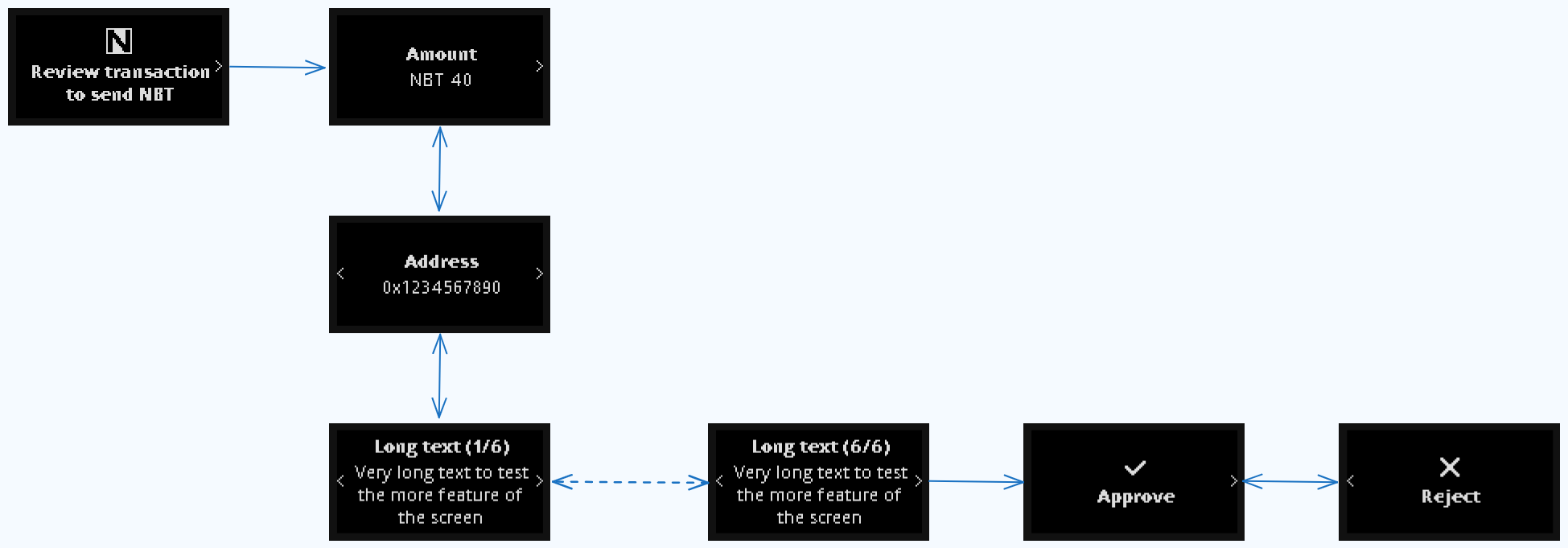
In some cases, the application cannot know all tag/value pairs of a transaction when the review is started.
In this case, what we call a streaming review can be used. The pages to display for each stream* are computed automatically and pages can be navigated forward and backward.
In case of a tag/value pair too long to be fully displayed, the value is automatically split on successive pages, adding an indication (n/m) in the name.
At the end of the review flow, the user has 2 pages to Approve or Reject the transaction. Finally, the given callback is called and it's up to app's developer to call nbgl_useCaseReviewStatus().
The API to initiate the display of the series of pages is nbgl_useCaseReviewStreamingStart(), providing:
- The type of operation to review (transaction, message or generic operation)
- The title and icon for the presentation page
- A callback with one boolean parameter:
- If this parameter is false, it means that the transaction is rejected.
- If this parameter is true, it means that NBGL is waiting for new data, sent with nbgl_useCaseReviewStreamingContinue()
As long as there are new tag/value pairs to send, the API to call is nbgl_useCaseReviewStreamingContinue(), providing:
- The list of tag/value pairs (or a callback to get them one by one)
- A callback with one boolean parameter:
- If this parameter is false, it means that the transaction is rejected.
- If this parameter is true, it means that NBGL is waiting for new data, to be sent with nbgl_useCaseReviewStreamingContinue()
- Note
- Considering skip is not available on Nano device, nbgl_useCaseReviewStreamingContinueExt() is useless and directly mapped to nbgl_useCaseReviewStreamingContinue()
When there is no more data to send, the API to call is nbgl_useCaseReviewStreamingFinish(), providing:
- A callback called when the review is Approved or Rejected. The callback's param is true for approval, false for rejection.
nbgl_useCaseReviewStreamingBlindSigningStart() and nbgl_useCaseAdvancedReviewStreamingStart() behave like nbgl_useCaseReviewStreamingStart() but automatically prepend a warning page before the first stream. The continuation and finish APIs are the same.
Here is the code to display something similar to example picture:
Review with warning Use Case
The review itself behaves like in Review Use Case. The main differences is:
- The review itself is preceded by a warning page
The API to initiate the display of the series of pages is nbgl_useCaseAdvancedReview(), providing:
- the type of operation to review (transaction, message or generic operation)
- the list of tag/value pairs (or a callback to get them one by one)
- the texts/icon to use in presentation page and in last page
- the configuration to use for the warning (see nbgl_warning_t structure)
- a callback called when the long press button on last page or reject confirmation is used. The callback's param is true for confirmation, false for rejection.
- Note
- the recommended configuration for warning is the predefined one. In this case, one just has to fill the predefinedSet field of nbgl_warning_t with the appropriate warning causes (bitfield) and the reportProvider field with the name of the 3rd party providing the Web3Checks report, if necessary.
Here is a code sample:
Address Review Use Case
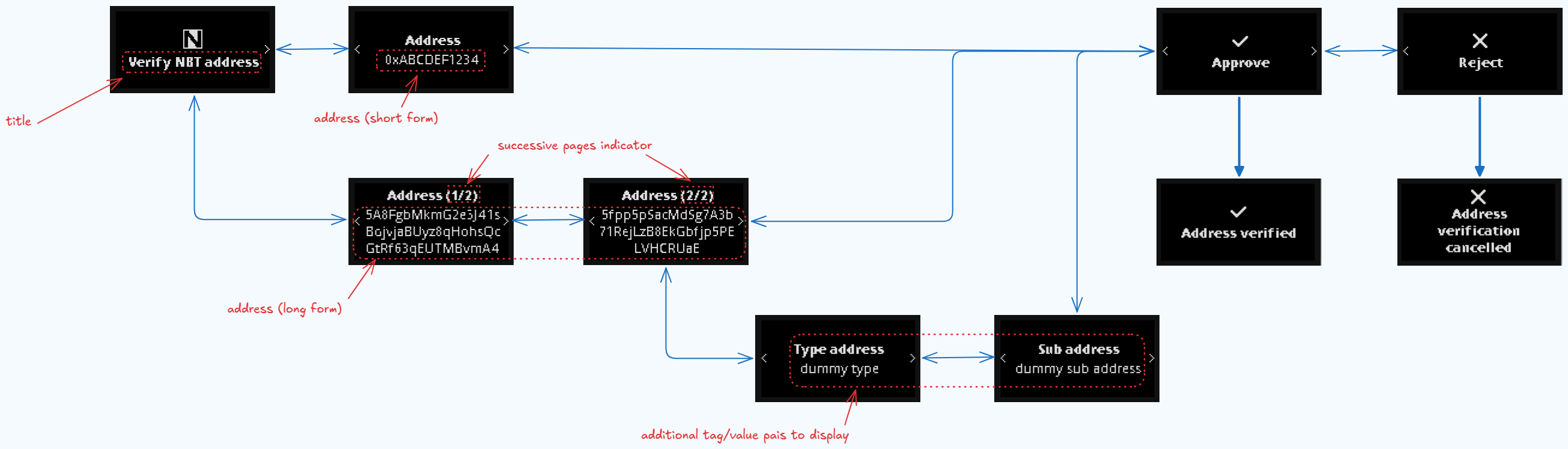
When an address needs to be confirmed, it can be displayed in a Address Review Use Case.
After a title page, a second page is displayed with the raw address (as text).
Moreover, if extra information need to be displayed, in the form of tags/values, they are show in successive pages.
- Note
- In case of a tag/value pair too long to be fully displayed, the value is automatically split on successive pages, adding an indication
(n/m)in the name.
At the end of the review flow, the user has 2 pages to Approve or Reject the review. Finally, the given callback is called and it's up to app's developer to call nbgl_useCaseReviewStatus().
The nbgl_useCaseAddressReview() function enables to create such a set of pages, with the following parameters:
- The address to confirm (NULL terminated string)
- A callback called when the review is Approved or Rejected
- The optional list of extra tag/value pairs
Here is the code to display something similar to example picture:
Spinner Use Case
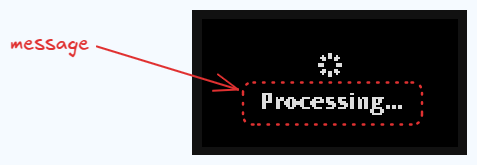
This Use Case is simply to display a static waiting page
The nbgl_useCaseSpinner() function enables to create such a page, without any parameters.
Keypad Use Case
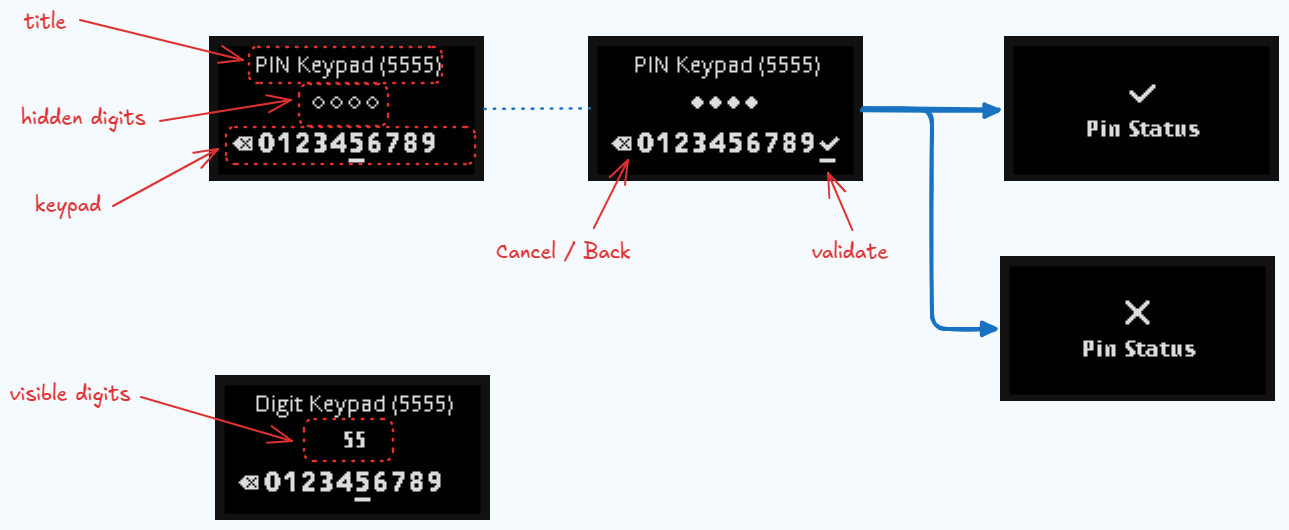
We have here 2 different variants, allowing to show or hide the entered digits.
When a pincode is requested, a default keypad can be displayed, with hidden digits.
The nbgl_useCaseKeypad() function enables to create such page, with the following parameters:
- A title
- The min and max lengths
- A boolean to request a shuffled keypad
- A boolean to request hidden digits
- Callbacks for navigation and pin validation
- Note
- The backspace and validate buttons will be shown or hidden automatically.
- The backspace button is also used as a cancel button, when no digits are selected.
- The max nb of supported digits is 12.
Here is the code to display something similar to example picture:
Keyboard Use Case
When text input is required (not just digits), a full keyboard can be displayed on Nano devices. The keyboard is navigable using the physical buttons, and supports different modes (lowercase, uppercase, digits, special characters).
The keyboard can be configured with either a confirmation button or dynamic suggestion buttons.
The nbgl_useCaseKeyboard() function enables to create such page, with the following parameters:
- A pointer to nbgl_keyboardParams_t structure containing:
- type: either KEYBOARD_WITH_BUTTON or KEYBOARD_WITH_SUGGESTIONS
- title: the page title
- entryBuffer: buffer to store the entered text
- entryMaxLen: maximum length of text
- mode: initial keyboard mode (MODE_LOWER_LETTERS, MODE_UPPER_LETTERS, MODE_DIGITS_AND_SPECIALS, MODE_NONE)
- lettersOnly: if true, only letter keys and Backspace are shown
- confirmationParams or suggestionParams: depending on the type
- A callback for the back action
Keyboard with Confirmation Button (Nano)
This variant is used when you simply need to validate the entered text with a button.
Here is an example code to create a password nickname:
Keyboard with Suggestions (Nano)
This variant is used when you want to provide dynamic suggestions as the user types. This is particularly useful for word-by-word input, like entering a BIP39 recovery phrase.
- Note
- On Nano devices, suggestions are navigated using the same buttons as the keyboard.
Here is an example code for entering BIP39 words:
Utility functions
The following functions compute how many items of a given type fit in a single review or settings page. They are useful when building custom paginated content with nbgl_useCaseGenericReview() or similar APIs.
- nbgl_useCaseGetNbTagValuesInPage() — returns the number of tag/value pairs that fit in one page starting at a given index. Sets the requireSpecificDisplay output flag when the pair needs special rendering (centeredInfo flag or value too long).
- nbgl_useCaseGetNbChoicesInPage() — returns the number of radio-choice items that fit in one page starting at a given index.
All functions take the navigation bar into account: when a navigation footer is present the available area is reduced accordingly.
Refreshing screen
After having drawn graphic objects in framebuffer, all functions of this API automatically refresh the screen. So no need to call nbgl_refresh().